
You are not crazy. One day, your car feels fast, snappy, and light. You hit every aerial. Your dribbles are smooth. The next day? Your car feels like a brick. Turning takes forever. You feel slow, heavy, and disconnected from the game.
The community calls this the Rocket League Heavy Car Bug. Here is the thing: Game developers have looked at the code. They say there is no "bug." But the feeling is real. It destroys your confidence and ruins your rank. This guide is for competitive players who need their mechanics back. We are going to fix the input lag, connection issues, and mental fatigue that cause this heavy feeling.
Is the Rocket League Heavy Car Bug Real or a Myth?
Before we fix it, we need to know what we are fighting. Most players think the game is slowing down their car. Actually, the Rocket League Heavy Car Bug usually comes from a mix of three things:
- Input Lag: Your controller tells the car to turn. The screen shows it happening a split second later. Your brain interprets this delay as "heaviness."
- Packet Loss (Desync): If your internet drops data, the server corrects your car's position. This constant correction feels like invisible resistance pushing against you.
- The Placebo Effect: Sometimes, your eyes just get tired.
Let’s strip away the mystery and fix your settings.
Best Settings to Fix Rocket League Heavy Car Bug (PC & Console)
If your settings are wrong, practice will not help. These changes reduce the delay between your thumb and your screen. For a deep dive on controller choice, check out our guide on Best Rocket League Controllers.
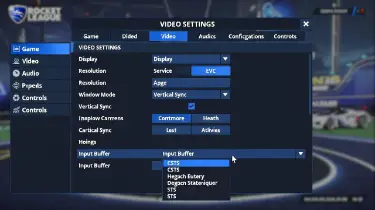
Turn Off V-Sync to Reduce Input Lag
This is the most common cause of the Rocket League Heavy Car Bug.
- What it does: V-Sync forces your game to wait for your monitor to be ready before showing a new frame.
- The problem: That "waiting" time is input lag. It makes steering feel floaty.
- The Fix: Go to Settings > Video and uncheck Vertical Sync.
Change Input Buffer to Fix Heavy Car Bug
Most guides ignore this setting, but it is important. This setting changes how the game handles data from the server.
- Default: Good for perfect internet.
- STS (Simpler): This allows the game server to correct your position slightly to match the stream.
- CSTS (Continuous): This constantly corrects the connection.
Recommendation: If you have the Rocket League Heavy Car Bug, switch your Input Buffer to CSTS. It might look a tiny bit jittery, but your inputs will feel instant.
| Input Buffer Setting | Best For... | Effect on Heavy Car Bug |
|---|---|---|
| Default | Perfect Internet (LAN) | Neutral. Can feel heavy on bad WiFi. |
| STS | Average Internet | Good. Reduces the "drag" feeling. |
| CSTS | Unstable Internet | Best. Fixes heaviness, but cars may teleport slightly. |
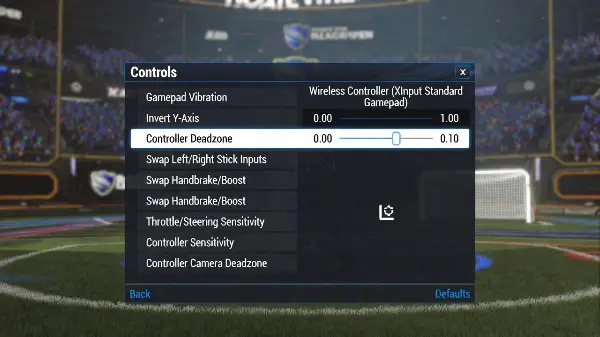
Adjust Deadzone Sensitivity
Sometimes your controller is just getting old. If your Deadzone (how far you move the stick before the car turns) is too high, you have to move your thumb further to turn. This tricks your brain into thinking the car is heavy.
Pro Tip:
Lower your deadzone to 0.05 or 0.10. This makes steering feel much snappier.
The "Slo-Mo" Training Method
Sometimes, the issue is not your PC. It is your brain. When you play for hours, your brain gets used to the speed. It stops reacting as fast. This makes the car feel slow. You can reset this mental fatigue with a simple trick used by Grand Champs.
- Create a Private Match.
- Go to Mutator Settings.
- Set Game Speed to Slow-Mo.
- Play for 10 minutes.
When you go back to normal speed, the game will feel incredibly fast. The "heavy" feeling usually disappears instantly because your brain is forced to wake up.
Hardware Fixes for Rocket League Heavy Car Bug
If the game settings didn't work, let's look at your gear.
Controller Polling Rate
If you play on PC, your USB port might be checking your controller too slowly. Standard controllers report their position 125 times per second (125Hz). You can "overclock" this to 1000Hz using software like DS4Windows. This cuts input delay from 8ms down to 1ms. It makes steering feel snappy.
Use a Wired Connection
WiFi is unstable. Even if your ping is low, "Packet Jitter" makes the server constantly correct your car. Packet Jitter refers to small changes in speed. This correction feels like you are driving in mud. Always use an Ethernet cable if you can.
FAQ: Rocket League Heavy Car Bug
Does the Rocket League Heavy Car Bug exist in 2026?
Not in the game code. Psyonix has confirmed there is no line of code causing it. However, the symptom is very real. It is caused by input lag, hardware latency, or network issues.
Will a new controller fix the Heavy Car Bug?
Maybe. If your old controller has "stick drift" or worn-out sensors, a new one will feel much faster and responsive.
Does FPS affect the Heavy Car Bug?
Yes. Higher FPS (Frames Per Second) lowers input lag. Try to get at least 120 FPS or 240 FPS if your monitor supports it.