
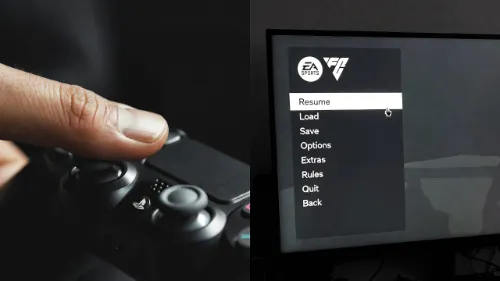
You know the feeling. You tap the "Down" button in the main menu once, but the cursor jumps two spots. Or worse, you are in a match, you try a simple ball roll, and your player just runs straight into the defender.
This is not just lag. It is the EA FC double input glitch.
Here is the thing: your PC is confused. It thinks you have two controllers plugged in at the same time. It reads the signal from your real controller and a fake "virtual" controller created by software like Steam or DS4Windows. The game tries to listen to both, and everything breaks.
We will fix this right now so you can get back to smooth gameplay.
1. Why the EA FC Double Input Glitch Happens on Your PC
Before we fix it, you need to know why this happens. When you plug a PlayStation controller into a Windows PC, Windows doesn't always know what to do with it. So, you use tools like Steam or DS4Windows to make it act like an Xbox controller.
The problem? The game sees both.
- Device A: Your physical DualSense/DualShock controller.
- Device B: The emulated Xbox controller created by the software.
When you press "Pass," the game gets the command twice. This causes the "EA FC double input glitch" that ruins your dribbling and makes menus impossible to use. If you are also experiencing stick drift, check our guide on How to Fix Stick Drift.
2. Test for the EA FC Double Input Glitch Before You Play
Most guides skip this part, but it is the most important step. Don't launch the game yet. You need to verify if your computer is actually reading two inputs.
Use a Gamepad Tester Tool:
- Close EA FC and the EA App.
- Open your browser and go to TestMyGamePad.
- Connect your controller.
- Look at the list of connected devices.
What to look for:
- Good Result: You see only one controller listed (e.g., "Xbox 360 Controller").
- Bad Result: You see two controllers listed (e.g., "Wireless Controller" AND "Xbox 360 Controller").
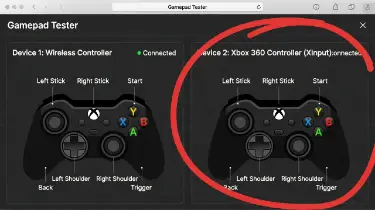
If you see two, you definitely have the EA FC double input glitch. If you press a button and two different indicators light up on the screen, you have "ghost inputs."
3. Fix the EA FC Double Input Glitch by Disabling Steam Input
If you own the game on Steam or launch the EA App through Steam, this is usually the culprit. Steam tries to manage your controller, but the EA App fights for control too.
Follow these steps:
- Open your Steam Library.
- Right-click on EA FC.
- Select Properties.
- Click on the Controller tab.
- Find the dropdown menu for "Override for EA FC".
- Set it to Disable Steam Input.
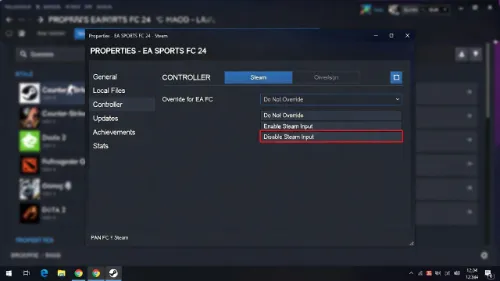
Restart the game. This stops Steam from forcing a second layer of inputs, which often solves the EA FC double input glitch immediately.
4. Fix the EA FC Double Input Glitch Using DS4Windows (PlayStation)
If you use a PS4 or PS5 controller, you probably use DS4Windows. This program is great, but it is the main cause of double inputs if not set up right.
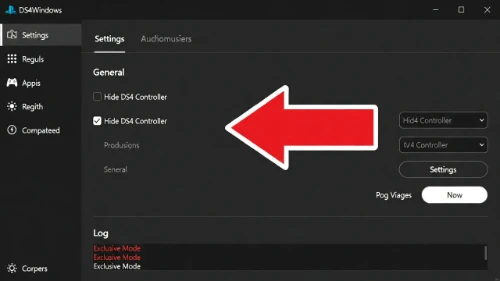
You need to use a setting called "Hide DS4 Controller."
- Open DS4Windows.
- Go to the Settings tab.
- Check the box that says "Hide DS4 Controller".
- Look at the log at the bottom. It should say "Exclusive Mode."
If it fails to hide:
You might see a red error message. This means another app (like Steam, Ubisoft Connect, or the EA App) is already gripping the controller. Close all other launchers completely and try checking the box again.
5. Fix the EA FC Double Input Glitch via HidHide (Advanced)
Sometimes, checking a box isn't enough. Windows is stubborn. If the EA FC double input glitch persists, you need a tool called HidHide. This tool acts like a bouncer. It blocks the game from seeing your physical controller so it only sees the virtual one.
How to set it up:
- Download and install HidHide.
- Restart your PC.
- Open the HidHide Configuration Client.
- Go to the Devices tab.
- Find your physical controller (it usually has a Sony or Wireless label) and check the box next to it.
- Check the box at the bottom that says "Enable Device Hiding".
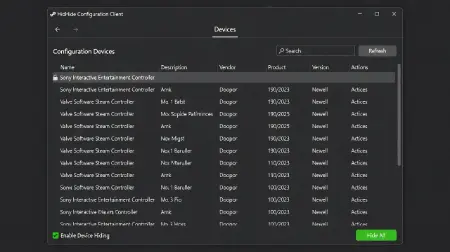
Now, Windows is forced to ignore the physical hardware, leaving only the clean, emulated signal. This is the strongest way to kill the EA FC double input glitch.
Summary: Which Fix is Right for You?
| Your Setup | Most Likely Cause | The Best Fix |
|---|---|---|
| Xbox Controller via Steam | Steam Input Overlay | Disable Steam Input |
| PS5 Controller (Wired) | Windows Driver Conflict | Disable Steam Input |
| PS5 Controller (DS4Windows) | Double Signal | Enable "Hide DS4" |
| Generic Controller | Driver Overlap | Use HidHide |
For more tips on optimizing your setup, check our guide on How to Calibrate Your Controller.
Frequently Asked Questions
Q: Does the EA FC double input glitch affect dribbling?
Yes. The EA FC double input glitch makes dribbling feel slow and unresponsive. Because the game receives two signals, it often cancels out skill moves or registers them late, making your players feel like they are turning in mud.
Q: How do I know if I have the EA FC double input glitch?
The easiest test is in the main menu. Tap the D-pad down once. If the cursor skips over an option and lands two spots down, you have the double input glitch. You can also verify this using a gamepad tester tool.
Q: Will reinstalling the game fix the EA FC double input glitch?
No. Reinstalling the game rarely works because the issue is with your PC's controller drivers, not the game files. You must fix the controller conflict in Steam or DS4Windows.
Q: Is Bluetooth worse for the EA FC double input glitch?
Bluetooth can sometimes make the issue harder to fix because Windows manages wireless devices differently. Using a wired connection is often more stable and makes it easier to "Hide" the physical controller in settings.