
Stick drift is the worst. You line up a perfect headshot, take your thumb off the stick, and your crosshair slowly drifts to the left. You miss the shot, and you lose the game. It is not just you. Most controllers develop this issue over time. The good news is that you can often fix it inside the Call of Duty menus. You do not need to buy a new controller unless your hardware is completely broken.
Quick Summary: The Best Deadzone Settings
If you want to jump straight into the action, start with these numbers. These are the "safe" settings used by many pro players.
| Setting Name | Value | What It Does |
|---|---|---|
| Left Stick Min | 0.03 - 0.05 | Prevents accidental movement. |
| Right Stick Min | 0.05 | Prevents aim drift while keeping precision. |
| Left Stick Max | 0.65 - 0.75 | Makes you sprint faster (less thumb movement). |
| Right Stick Max | 0.99 - 1.00 | Gives you full control over your aim speed. |
Before you start:
Make sure you have tested your controller to confirm the issue.
Launch Tester ToolWhat Are Deadzone Settings in Call of Duty?
Think of a "deadzone" as a safety bubble around your thumbstick. When your deadzone is set to 0.00, the game registers even the tiniest vibration. If a speck of dust gets in your controller, your character spins.
When you set a deadzone (like 0.05), you are telling the game: "Ignore everything until I move the stick past this point." This stops the ghost movements.
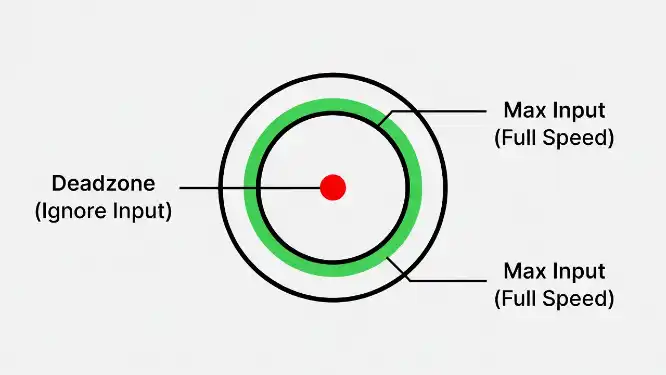
Visualizing Deadzones: The red area is where your controller ignores drift. The green area is where you hit max speed.
Step-by-Step: How to Find Your Perfect Settings
Don't just copy a streamer. Every controller is different. Call of Duty has a built-in tool that shows you exactly how broken your controller is. Here is how to use it.
1. Open "Test Stick Deadzone"
Go to Settings > Controller > Inputs. Look for the option that says Test Stick Deadzone and turn it On.
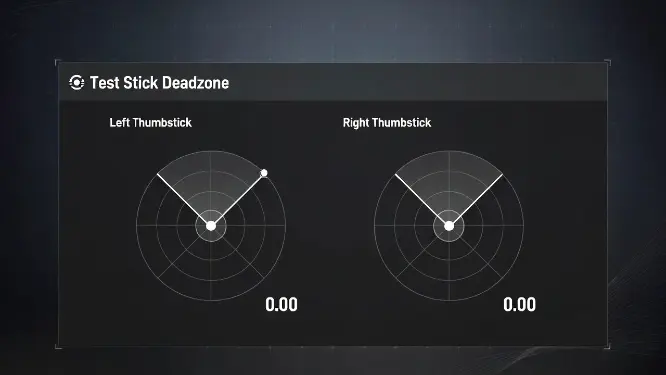
Use this tool to see if your controller is drifting when you aren't touching it.
2. Check for "Ghost" Movement
Take your thumbs off the controller. Look at the numbers.
- If the number says 0, you are good.
- If the number is jumping around (like 0.03 or 0.04) without you touching it, that is your drift.
3. Adjust the "Min Input"
Go back to the settings slider. Increase your Min Input Deadzone until it is just slightly higher than your drift number. (Example: If your drift is 0.04, set your deadzone to 0.05).
The Secret Setting: Lower "Left Stick Max"
Most guides ignore this setting, but it changes how fast you feel. The Max Input setting controls how far you have to push the stick to hit "maximum speed."
- Right Stick Max (Aiming): Keep this at 0.99. You want the full range of motion for precise shots.
- Left Stick Max (Movement): Lower this to 0.65 or 0.70.
When you lower the Left Stick Max, you don't have to smash the stick all the way to the plastic edge to sprint. You hit "full sprint" speed with less movement. This makes your movement feel snappier.
Mythbusting: Does Drift Help Aim Assist?
There is a popular theory online that you should let your controller drift a little bit to keep Rotational Aim Assist active. Do not do it.
While technically true, the trade-off is bad. If you have drift, your long-range shots will be inaccurate, and fighting recoil becomes harder. It is better to activate aim assist by strafing (moving your Left Stick) rather than relying on a broken sensor.
When Settings Can't Fix It (Hardware Issues)
If you have to set your Deadzone above 0.15 to stop the drift, your controller is likely damaged. The sensors inside (called potentiometers) wear out over time due to friction.
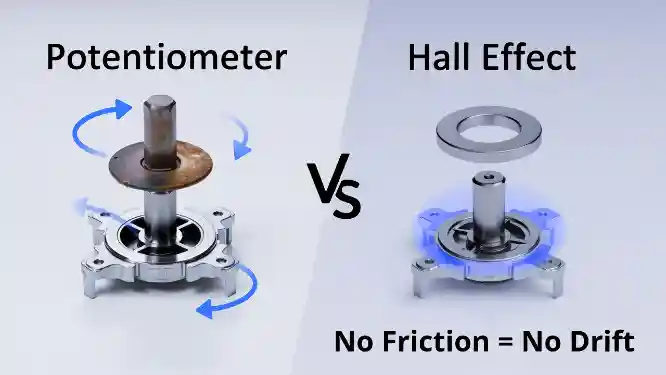
Hall Effect sensors (right) use magnets to prevent the physical wear and tear that causes stick drift.
The Long-Term Fix: Consider upgrading to a Hall Effect controller. These use magnets instead of physical contact points. Because the parts don't rub against each other, they technically never develop stick drift.
Frequently Asked Questions
Q: What is the best deadzone setting?
A: Start with 0.05 for Min Input and 0.99 for Right Stick Max.
Q: Does lower deadzone give better aim?
A: Yes, it makes aim more responsive, but setting it too low causes drift.
Q: How do I fix stick drift without taking it apart?
A: Increase the Min Input Deadzone setting in the game menu until the ghost movement stops.