
You are in a match. You hear an enemy behind you. You slam your joystick to the left to spin around, but your character turns like a tank. You die. This is the "slow turn" bug.
It is one of the most annoying issues for PS5 players. Many people think their controller has "stick drift," but this is different. Drift is when your camera moves on its own. Slow turn is when your camera refuses to move fast enough.
Here is the good news: You usually do not need a new controller. You can fix or mask this issue using settings inside Apex Legends. Let’s get your aim back to normal.
What Causes Apex Legends Slow Turn on PS5?
Before we fix it, we need to know what is broken. The slow turn issue happens for two main reasons:
- Sensor Wear: The sensors inside your joystick wear out over time. When you push the stick 100% to the edge, the sensor might only send a signal of 80% or 90% to the PS5. The game thinks you are only pushing the stick slightly, so it turns you slowly.
- Interference: Sometimes, the Bluetooth signal gets weak or interrupted by other devices. This causes "heavy" or delayed inputs.
Step 1: Diagnose the Apex Legends Slow Turn Bug
We need to verify if this is a hardware failure or just a glitch. Do not guess. Test it.
The Gamepad Tester Method:
You need to see exactly what your controller is telling the console.
- Connect your PS5 DualSense controller to a PC or phone. You can use Bluetooth or a USB cable.
- Go to the website Gamepad Tester (Internal Link).
- Move your joysticks in circles.
- Look at the numbers on the screen.
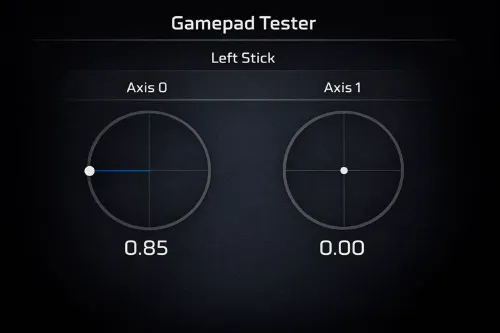
If your stick is physically at the edge but the number is less than 1.00, your sensor is failing.
What to look for:
When you push the stick all the way to the edge, the value should be 1.0000. If you push it fully left and the number only reaches 0.85 or 0.90, your sensor is failing. This is why you turn slowly.
Step 2: Fix Apex Legends Slow Turn with ALC Settings
If your sensor is not reaching 100%, you can force Apex Legends to ignore the broken part. This is the best fix because it costs zero dollars. We will use Advanced Look Controls (ALC).
How to set it up:
- Go to Settings > Controller.
- Scroll to the bottom and turn Advanced Look Controls to ON.
- Find the section called Target Compensation or stick mapping.
| Setting Name | Recommended Value | Why It Helps |
|---|---|---|
| Outer Threshold | 1% to 2% | This shrinks the "edge" of your stick. It tells the game to hit max speed before you physically hit the plastic edge. |
| Extra Yaw / Pitch | 220 to 250 | This adds a speed boost when your stick hits the outer edge. It overrides the slow sensor. |
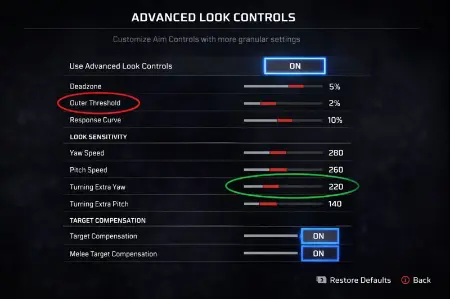
Lowering the Outer Threshold to 1-2% forces the game to register max speed earlier.
Step 3: Fix Apex Legends Slow Turn by Changing Connection
Sometimes the issue is not the joystick. It is the wireless signal. PS5 controllers can suffer from interference. This makes aiming feel heavy or muddy.
Switch to Wired Mode:
Plugging in the USB cable does not automatically send data over the wire. You have to change a setting.
- Go to your PS5 Home Screen.
- Select Settings > Accessories.
- Select Controller (General).
- Change Communication Method from "Use Bluetooth" to "Use USB Cable".
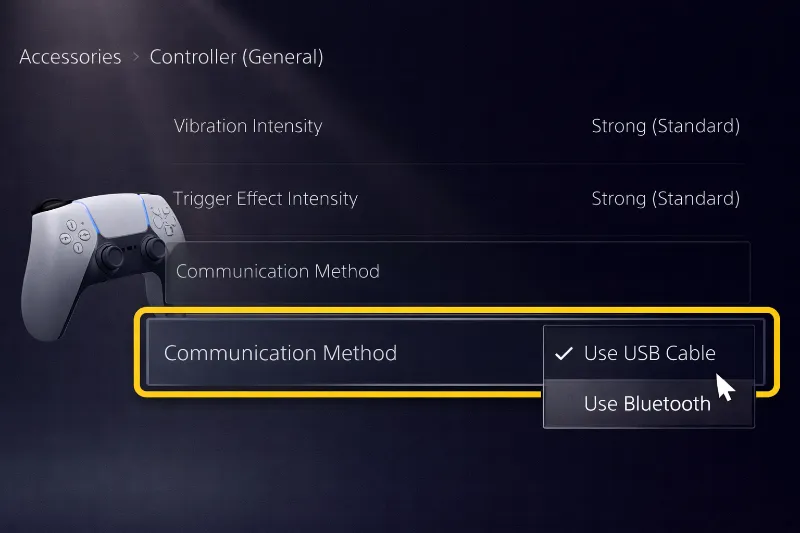
Play a match with the cable plugged in. If the slow turn disappears, your issue was wireless interference, not a broken sensor.
Step 4: Clean the Apex Legends Slow Turn Sensor
If the software changes did not help, you might have dust or dirt blocking the sensor inside. See our guide on How to Fix Stick Drift (Internal Link) for a deeper cleaning guide, but try this quick fix first.
The "Massage" Method:
You do not need to take the controller apart yet.
- Turn off the controller.
- Press the affected stick down (L3 or R3) and hold it.
- While pressing down, rotate the stick in a full circle 20 times clockwise.
- Rotate it 20 times counter-clockwise.
When to Buy a New Controller for Apex Legends
If you tried the ALC fix, switched to USB, and cleaned the stick, but you still turn slowly, the sensor module is likely dead.
Do not buy the same controller again. Standard DualSense controllers use potentiometers. These are parts that rub together and wear out. If you buy a new one, this will happen again in 6 months.
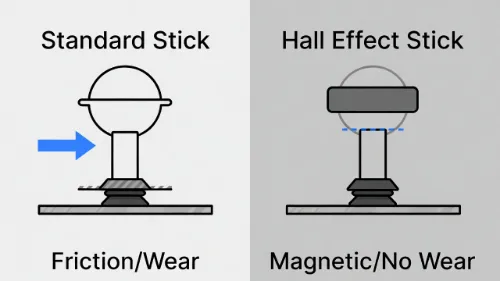
The Solution: Hall Effect
Look for "Hall Effect" Controllers. They use magnets to read movement. The parts do not touch. They never wear out, and they never get stick drift or slow turn.
FAQ: Apex Legends Slow Turn on PS5
Why does my player turn slow on one side in Apex Legends?
This usually means the sensor for that specific direction is worn out. If you turn left slowly, the left-side sensor inside your joystick is not sending a 100% signal. Use the "Outer Threshold" setting in ALC to fix this.
Can stick drift cause slow turn in Apex?
No, they are opposites. Stick drift makes you move when you don't want to. Slow turn stops you from moving fast when you do want to. However, a dirty sensor can cause both problems at the same time.
Does increasing sensitivity fix slow turn on PS5?
Simply raising your standard sensitivity (like 4-4 or 5-5) often won't fix it. If the sensor signal is blocked, the game still thinks you aren't pushing the stick fully. You need to adjust the "Outer Threshold" in Advanced Look Controls (ALC) instead.