
You bought a high-end device, plugged it in, and saw a setting asking you to choose between 125Hz, 500Hz, or 1000Hz. You might think, "Higher is always better, right?" Well, not always.
If you pick the wrong setting, you could drain your battery twice as fast. You might even cause your games to stutter. Let’s break down exactly what polling rate means, why the difference between 125Hz and 1000Hz matters, and which one you should actually use for your gamepad or mouse.
1. Polling Rate Basics: What Does Hz Mean?
In simple terms, polling rate is how often your device reports its position to your computer. Think of it like a conversation between your controller and your PC.
- Low Polling Rate (125Hz): Your controller talks to the PC 125 times every second. It says, "I'm here," waits a bit, then says, "I'm here" again.
- High Polling Rate (1000Hz): Your controller screams, "I'm here!" 1,000 times every second.
The gap between these reports is measured in milliseconds (ms). This is arguably the most important number to look at.
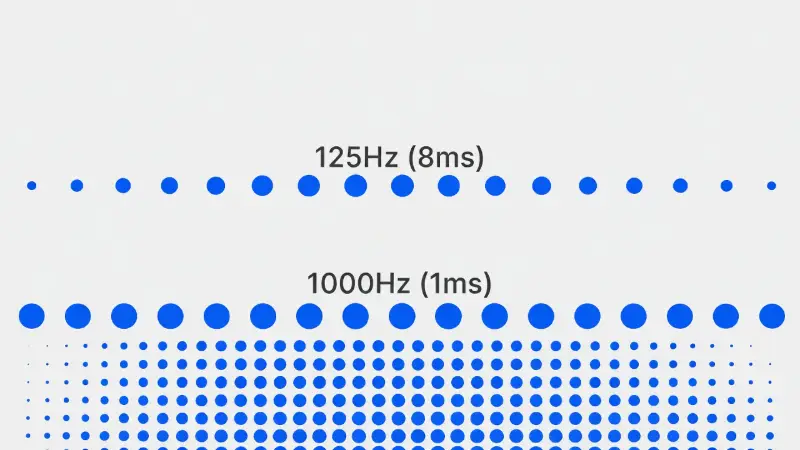
| Polling Rate (Hz) | Response Time (Delay) |
|---|---|
| 125Hz | 8 milliseconds (Slowest) |
| 250Hz | 4 milliseconds |
| 500Hz | 2 milliseconds |
| 1000Hz | 1 millisecond (Fastest) |
2. The Differences: 125Hz vs. 1000Hz
When you switch from 125Hz to 1000Hz, you technically reduce the delay from 8ms to 1ms. But can you actually feel that 7ms difference?
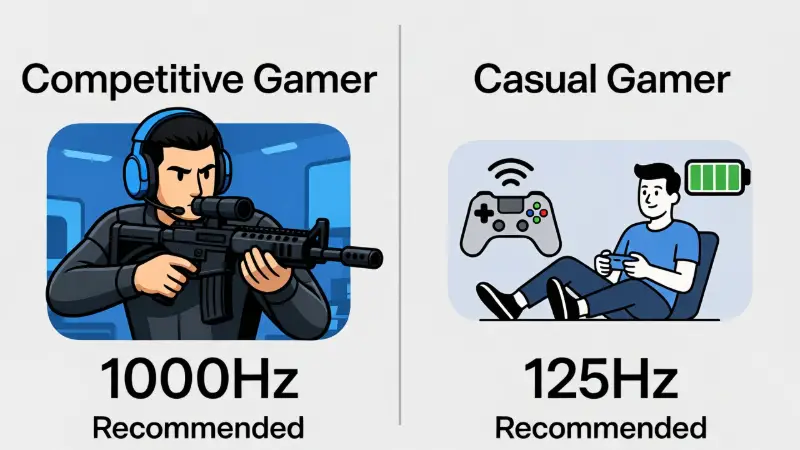
Who Needs 1000Hz Polling Rate?
If you play fast-paced shooters like Call of Duty, Valorant, or Apex Legends, 1000Hz is the standard. In these games, a split-second delay can make you miss a headshot.
- Pros: Smoother cursor movement, lower input lag.
- Cons: Higher battery usage, higher CPU usage.
Who Should Stick to 125Hz Polling Rate?
If you play strategy games, RPGs (like Elden Ring), or use your PC for office work, 125Hz is completely fine. It is stable and efficient.
- Pros: Incredible battery life, very stable signal.
- Cons: Feels "floaty" or slow on high-refresh-rate monitors (144Hz+).
3. Gamepad vs. Mouse: The Hidden Difference
Most guides talk about mice, but gamepad polling rate is a totally different story. This is where many controller users get stuck.
Here is the thing: While gaming mice often come set to 1000Hz out of the box, controllers usually don't.
- Xbox Controllers on Bluetooth: Often locked to roughly 125Hz by Windows to save bandwidth.
- PS5 DualSense on Bluetooth: Can fluctuate or lock to 250Hz on PC without special software.
If your controller feels "laggy" compared to your mouse, it is likely because your gamepad polling rate is stuck at a lower speed. You might need to use a wired connection or specific overclocking software to push a controller to 1000Hz.
Battery Life Warning
Using a controller at 1000Hz wirelessly can drain the battery in just 4-6 hours. Standard 125Hz rates can last 10+ hours.
4. Does High Polling Rate Affect CPU Performance?
Yes, understanding polling rate impact on your hardware is real. Every time your mouse or controller sends a report (1,000 times a second), your CPU has to stop and process that data.
If you have an older computer or a weak laptop, setting your device to 1000Hz (or the newer 4000Hz/8000Hz) can actually cause your game to stutter. If your frames drop when you move your mouse or joystick, try lowering your polling rate to 500Hz. It is the "sweet spot" that balances speed and PC performance.
5. How to Test Your Current Polling Rate
You shouldn't just trust what the box says. A wireless signal can be weak, dropping your real speed well below the target. You can check your real-time performance using our tool.
- Connect your device.
- Move the joysticks or mouse in continuous circles.
- Watch the "Average Hz" number.
Check Your Hz Now
See if your device is actually hitting 1000Hz or if it's stuck at 125Hz.
Launch Polling Rate Tester6. Frequently Asked Questions
Is 500Hz or 1000Hz polling rate better for gaming?
For most gamers, 1000Hz is better because it offers the lowest delay. However, 500Hz is smoother and uses less battery. If you cannot feel the difference, 500Hz is often the safer choice for stability.
Can I overclock my controller polling rate?
Yes, software like "DS4Windows" or "HIDUSBF" can force controllers to run at a higher polling rate on PC. Be careful, as this can sometimes cause connection instability.
What is the best polling rate for Fortnite?
Competitive Fortnite players almost always use 1000Hz. This ensures building and editing structures happens instantly.