
You press the button, but your character shoots a split second later. That tiny delay is called input lag. In competitive gaming, it ruins matches.
Most people go to Google, find a "gamepad tester" website, and see a bunch of numbers moving around. They see "250Hz" or "1000Hz" and think their controller is fast.
Here is the thing: Those websites are misleading you.
This guide explains why simple browser tools fail. We will show you how to run a real input lag test that actually means something. We will strip away the confusion and give you the raw data.
Why Most Online Input Lag Test Tools Are Wrong
To fix the problem, we first need to clear up a massive misunderstanding. There is a huge difference between Polling Rate and Input Lag.
- Polling Rate (Hz): This is how often your controller asks the computer, "Do you have new instructions?" A rate of 1000Hz means it checks 1,000 times per second.
- Input Lag (Latency): This is the time it takes for your button press to travel through the wire, get processed, and appear on your screen.
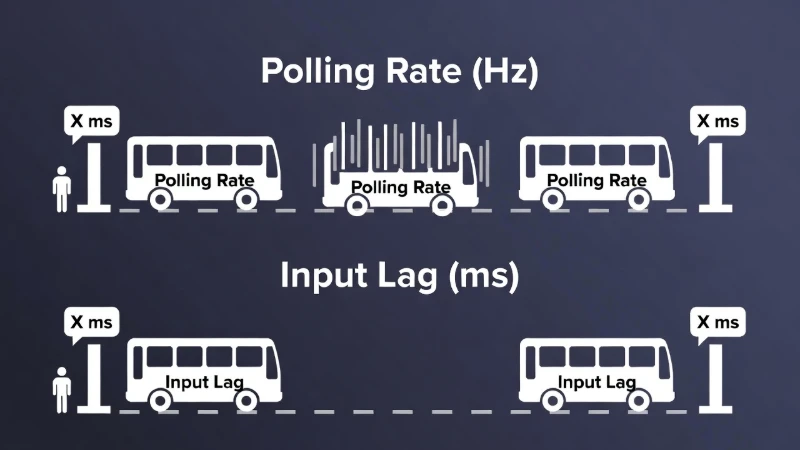
Think of it like a bus service. The bus might arrive every minute (High Polling Rate). But if the bus drives 20 miles per hour, your trip to work still takes forever (High Input Lag).
Most browser tools only measure the bus schedule (Hz). They do not measure the trip time. To get a true input lag test result, you need better methods.
Looking for a new controller?
If your current gear is too slow, check our guide on the Best Low Latency Controllers.
Method 1: The Best Software for an Input Lag Test (XInputTest)
If you are on a PC, you cannot rely on a web browser. Browsers add their own delay, so the numbers will never be perfect.
For the most accurate software-based input lag test, you should use a tool called XInputTest. It is a simple program that reads data directly from your controller driver, bypassing the browser clutter.
How to use it:
- Download the Tool: Look for XInputTest on GitHub.
- Run as Administrator: This ensures the program has full access to your hardware.
- The Circle Test: Rotate your analog sticks in smooth circles.
- Read the Data: Look for "Jitter" and "Average Latency."
What to look for:
- Excellent: 1ms to 4ms.
- Okay: 5ms to 10ms.
- Slow: Above 10ms (You will feel this in fast games).
This is the standard input lag test for gamers who want a quick "health check" on their gear without buying expensive equipment.
Method 2: The Camera Input Lag Test (High Accuracy)
Software tells you what the computer sees. But what about what you see?
For a true "End-to-End" input lag test, you need to measure the time from your finger hitting the button to the gun firing on the monitor. You don't need a lab for this—just a smartphone.
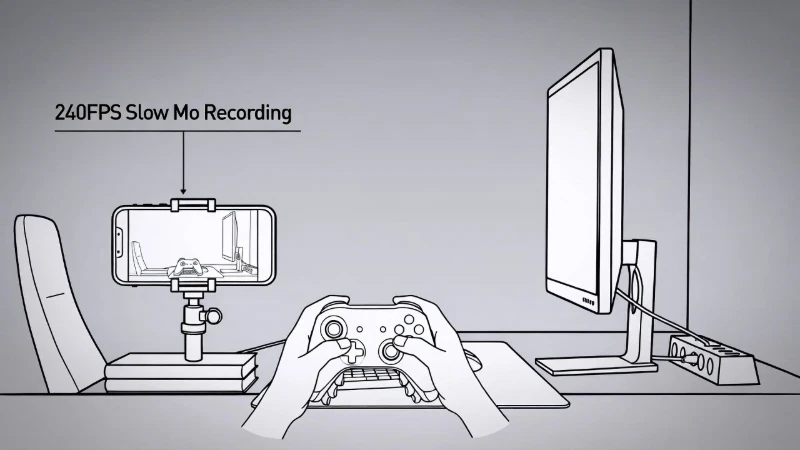
The Steps:
- Setup: Point your phone camera at your controller and your monitor. Make sure you can see both in the same shot.
- Settings: Set your phone camera to "Slow Motion" (240 FPS is standard on most iPhones and Androids).
- Action: Record yourself pressing a button (like jumping or shooting) and the screen reacting.
- Math Time: Open the video in a player where you can go frame-by-frame. Count the frames from the moment your finger fully presses the button until the action starts on screen.
Formula: (Number of Frames / 240) * 1000 = Latency in milliseconds.
If you count 12 frames at 240 FPS, your lag is 50ms. This covers your controller, your PC processing, and your monitor delay. This is the most honest input lag test you can do at home.
Input Lag Test Benchmarks: Is Your Controller Fast?
You ran the test. You have a number. Now, is that number good or bad?
We gathered data from professional hardware testers to give you a baseline. Compare your input lag test results to these averages.
| Controller Model | Connection Type | Average Latency (ms) |
|---|---|---|
| Sony DualSense (PS5) | Overclocked / Bluetooth | ~1.0 ms |
| Sony DualSense (PS5) | Wired (USB) | ~1.5 ms |
| Xbox Series X | Wired (USB) | ~6.8 ms |
| Xbox Series X | Bluetooth | ~10.0 ms |
| Xbox Elite Series 2 | Wireless Dongle | ~7.0 ms |
| Standard Mouse Click | Wired | ~0.5 - 2.0 ms |
*Note: Surprisingly, many PlayStation controllers are faster over Bluetooth than wired connections due to how they process signals.
How to Improve Your Input Lag Test Results
If your numbers are high, don't panic. You can fix a few things before buying a new gamepad.
- Overclocking: Tools like "hidusbf" let you force your controller to report faster. This can drop a standard controller from 8ms down to 1ms.
- Wired vs. Wireless: Interference hurts wireless signals. If you sit near a router, plug your controller in.
- Monitor Settings: Your controller might be fast, but your TV is slow. Always use "Game Mode" on your TV to reduce the display delay.
Running a regular input lag test helps you spot these issues early. This ensures you don't blame your skills when the hardware is at fault.
Frequently Asked Questions
How do I test input lag on my controller?
The most accurate way is to use a high-speed camera (240 FPS or higher). Film your finger pressing the button and the screen reacting. Count the frames between the press and the action to calculate the milliseconds. For a quicker software check on PC, use a tool called XInputTest.
What is a good result for an input lag test?
For competitive gaming, anything under 5ms is excellent. Casual gamers will feel comfortable with anything under 15ms. If your result is over 20ms, the game will feel "heavy" or unresponsive.
Is 1000Hz polling rate good for gaming?
Yes, 1000Hz is the gold standard for competitive gaming. It means your controller sends data every 1 millisecond. However, high Hz does not always guarantee low lag, so you should still perform an input lag test.
Why is my Bluetooth controller faster than wired?
This is common with Sony DualShock 4 and DualSense controllers. Their internal systems are designed to prioritize wireless signals, resulting in slightly lower latency over Bluetooth compared to a USB connection.