
Here is the situation. You are in the middle of a match. You let go of the thumbstick. But your character keeps walking. Or the camera keeps spinning. This is "Stick Drift," and it is the most annoying problem on the PlayStation 5.
The problem is usually just dirt inside the sensor. This sensor is called a potentiometer. If you clean it properly, your controller can work like new. This guide covers the real PS5 stick drift fix: cleaning potentiometers step-by-step. We will skip the temporary hacks and go straight to the solution that actually works.
What Causes PS5 Stick Drift and Why Cleaning Potentiometers Works
To fix the problem, you need to know what is breaking. Inside your controller, under the plastic thumbstick, there are two small sensors called potentiometers.
- How they work: As you move the stick, a small metal wiper slides across a carbon track. This tells the PS5 where you are aiming.
- The problem: Friction creates dust over time. This dust sits on the track and confuses the sensor. It tells the PS5 you are moving when you are actually standing still.
Tools You Need for This PS5 Stick Drift Fix
Don't use random liquids from your kitchen. You need the right tools to avoid damaging the electronics.
| Tool | Why You Need It |
|---|---|
| BW-100 or Contact Cleaner | This is safe for electronics. It dries instantly and leaves no residue. |
| Isopropyl Alcohol (90%+) | If you don't have contact cleaner, use this. Do not use 70% (it has too much water). |
| Plastic Pry Tool | To open the controller without scratching the plastic. |
| Small Phillips Screwdriver | Specifically a size PH00 or PH0. |
| Tweezers | Helpful for handling small screws and ribbon cables. |
Warning: Never use standard WD-40. It leaves an oil layer that will ruin your controller permanently. Only use "Electrical Contact Cleaner."
Phase 1: The "No-Open" Method (Try This First)
Before we take the controller apart, let's try a quick external clean. This fixes minor dust issues.
- Turn off the controller completely.
- Push the analog stick to the side to expose the ball underneath.
- Use compressed air to blow into the gap.
- Spray a tiny amount of contact cleaner into the gap while moving the stick in circles.
- Wait 5 minutes for it to dry.
Phase 2: Deep Cleaning Potentiometers (Step-by-Step PS5 Stick Drift Fix)
This is the main fix. We are going to open the controller to clean the sensor directly. Take your time.
Step 1: Open the Controller Shell
Use your plastic pry tool to pop off the black faceplate. It is the part around the sticks. It unclips easily. Underneath, you will see two screws. Remove them. Then, remove the L1 and R1 buttons to find two more screws.

Step 2: Remove the Battery and Tray
Once the screws are out, gently pull the back shell off. You will see the battery. Unplug it.
Critical Step: Under the battery tray, there is usually one hidden screw holding the motherboard. Remove it.

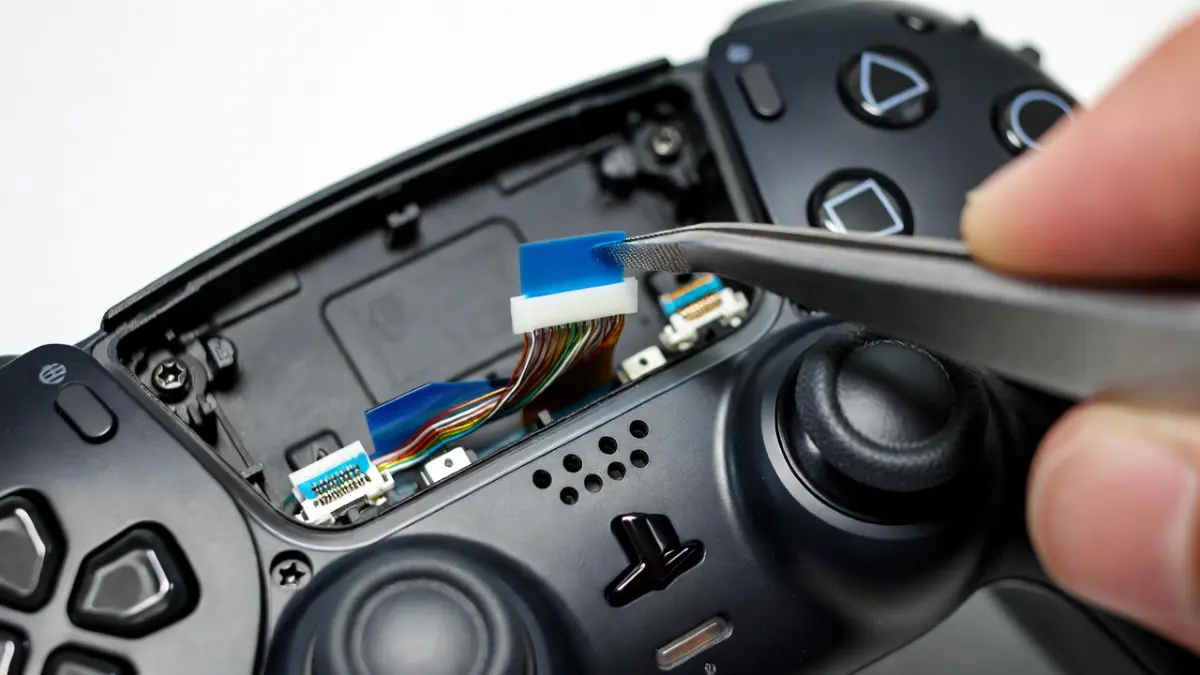
Step 3: Disconnect the Ribbon Cables
You will see flat cables connecting the triggers and microphone. This is where most people make mistakes.
Step 4: Locate the Potentiometers
Flip the motherboard over. Look at the analog stick box. You will see two green (or sometimes orange) plastic squares clipped onto the side of the metal box. These are the potentiometers.
Step 5: The "Green Gate" Trick
This is the secret to a good PS5 stick drift fix. You don't need to unsolder the whole unit.
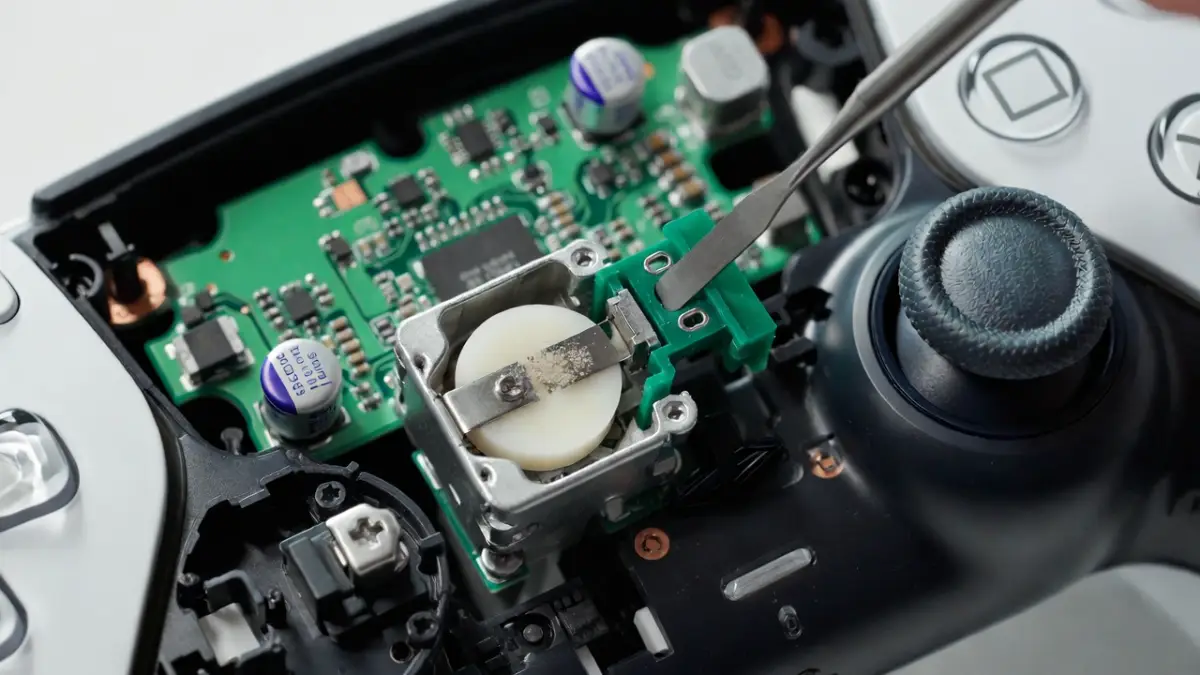
- Take a small flat tool.
- Very gently pry back the top of the green plastic casing (the "gate").
- Pull it just enough so it leans back.
- Inside, you will see a small white disc and a metal wiper.
Step 6: Cleaning the Sensor
Dip a Q-tip in your 90% alcohol or spray it with contact cleaner. Gently wipe the black carbon track inside the green housing. You might see black dirt come off on the Q-tip. That is the drift.

Step 7: Reassemble and Test
Snap the green gate back into place. Put the controller back together in reverse order.
How to Test Your Controller After Cleaning Potentiometers
Don't wait until you are in a game to see if it worked. Use a specialized tool.
What If Cleaning Potentiometers Doesn’t Stop the Drift?
If you followed this PS5 stick drift fix and it still drifts, the sensor might be physically worn out. It is not just dirty.
- The Metal Wiper Issue: Sometimes the metal wiper loses its "spring." When you have the green gate open, you can very gently bend the wiper contacts outward. This ensures they press harder against the track.
- The Permanent Fix: If cleaning fails, you can buy a "Hall Effect" stick module. This uses magnets instead of parts that touch, but you must have a pro solder it in.
Frequently Asked Questions About PS5 Stick Drift
Can I use hand sanitizer to clean my controller?
No. Hand sanitizer contains gels, scents, and water. These leave a sticky residue on your circuit board. Only use 90% isopropyl alcohol or electrical contact cleaner.
Does this PS5 stick drift fix void my warranty?
Yes. Taking your controller apart usually voids the warranty. You have to remove screws covered by the faceplate. If your controller is less than a year old, try contacting Sony support first.
Why does stick drift come back after cleaning?
If drift returns quickly, the carbon track inside the potentiometer might be scratched. Cleaning removes the dust, but it cannot fix a scratch. In this case, the sensor needs to be replaced.