
Your controller is dead. You plug it in, wiggle the cable, and maybe get a second of light before it cuts out again. It is frustrating. But before you throw a $60 controller in the trash, here is the good news: you can fix this.
Most guides say you need a soldering iron and complex tools. That is not always true. In this Xbox Series X USB-C port replacement guide, we break down two ways to fix your controller:
- The "Easy" Way: Swapping the whole circuit board (no soldering needed).
- The "Pro" Way: Replacing just the USB-C port (soldering required).
We also cover the Xbox Series X USB-C pinout. This helps you fix broken connections if a previous repair went wrong.
Before you start:
Make sure it's actually the port. Test your controller input first.
Launch Tester ToolXbox Series X USB-C Port Replacement: The "Easy" Way (Daughterboard Swap)
Microsoldering is hard. If you do not have a hot air station, you risk melting the plastic inside your controller.
The USB-C port on the Xbox Series X controller (Model 1914) is on a separate circuit board. This is called the "daughterboard." You do not have to replace the port itself. You can just replace the board.
Why Choose the Board Swap?
- Zero Soldering: You only need a screwdriver (T6 & T8 Security).
- Faster: It takes 10 minutes instead of an hour.
- Safer: There is no risk of burning the board or ripping pads.
The Part You Need
You need the Model 1914 Top Board (Power Board).
- Cost: Usually $15–$20.
- Part Number: Often labeled as M1107089-008.
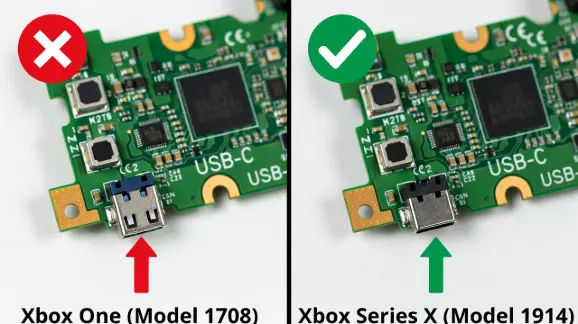
Note: Do not buy the older Xbox One board (Model 1708). They look similar, but the Series X board has a USB-C port, while the old one uses Micro-USB. For a full disassembly guide, check the iFixit Xbox Series X Teardown.
Xbox Series X USB-C Port Replacement: The "Pro" Way (Soldering)
If you have the tools, replacing the port is the cheapest fix. Ports cost about $5. However, this is not for beginners. The pins on these USB-C ports are hidden under the metal casing. This makes them hard to reach with a regular iron.
Critical Warning: Generic vs. OEM Ports
This is where most people fail. You cannot buy any "USB-C charging port" off Amazon.
- The Problem: Generic phone ports often have different "anchor legs." These are the big metal legs that hold the port down.
- The Fit: The Xbox Series X port has a leg spacing of roughly 8.6mm. Standard ports are often narrower. If you buy the wrong one, it will not fit the holes on the board.
- The Fix: Always search for "Xbox Series X Model 1914 USB-C Port" specifically.
Tools You Will Need
- Hot Air Station: Essential for removing the old port without ripping traces.
- Low-Melt Solder: Helps the old lead-free solder melt easier.
- Flux: You need lots of it.
- Microscope or Magnifier: The pins are tiny.
Xbox Series X USB-C Pinout & Wiring Diagram
Did you rip a solder pad off the board? Don't panic. You can still save the controller. You must run a "jumper wire." This is a thin wire that connects the pin directly to its destination on the board.
To do this, you need the Xbox Series X USB-C pinout.
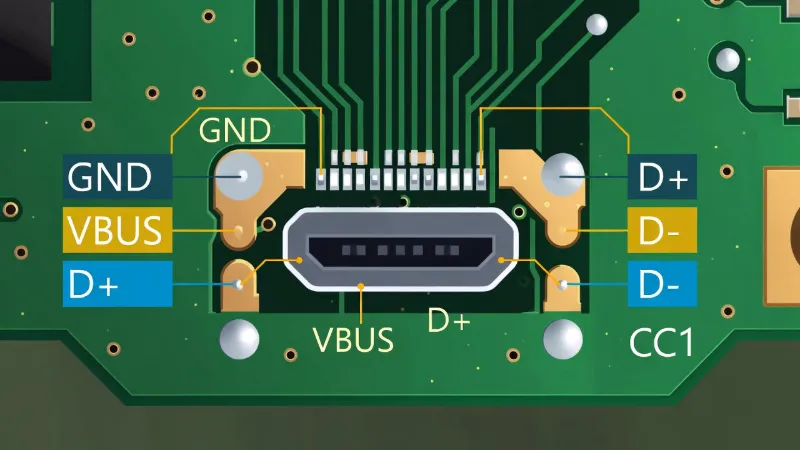
Pinout Functions & Test Points
| Pin | Function | What It Does | Where It Goes (Trace Path) |
|---|---|---|---|
| A4/B9 | VBUS | Power (5V) | Connects to the main fuse or capacitor near the port. |
| A1/B12 | GND | Ground | Connects to the large copper ground plane. |
| A6 | D+ | Data Positive | Vital for wired updates or PC gaming. |
| A7 | D- | Data Negative | Vital for wired updates or PC gaming. |
Xbox Series X USB-C Port Replacement Troubleshooting
Things go wrong. Here is how to handle common disasters during repair.
Problem: "I Ripped the Copper Pad Off the Board"
This happens if you pull the port before the solder melts.
The Fix: Use the pinout table above. Scrape away a tiny bit of the green coating (solder mask) on the trace leading away from the missing pad. Solder a thin wire from the port leg to that exposed copper.
Problem: "The New Port Is Loose"
The Cause: You likely did not use enough solder on the four main anchor legs.
The Fix: These legs take a lot of heat because they connect to the ground plane. Turn up your iron (around 380°C / 716°F for these legs only). Add more flux to get a solid joint.
Comparison: Board Swap vs. Port Replacement
| Feature | Daughterboard Swap (Easy) | Port Soldering (Hard) |
|---|---|---|
| Cost | High ($15 - $20) | Low ($2 - $5) |
| Skill Level | Beginner (Screwdriver only) | Advanced (Microsoldering) |
| Risk | Very Low | High (Board damage) |
| Time | 10 Minutes | 45-60 Minutes |
Frequently Asked Questions
Can I use a PS5 USB-C port on an Xbox Series X controller?
No. They are both USB-C, but the "footprint" is different. The plastic pins and metal legs will not line up with the Xbox board. Always buy a port listed for Model 1914.
What screwdriver do I need for Xbox Series X USB-C port replacement?
You need a Torx T8 Security and a Torx T6. The T8 Security has a hole in the tip to fit the pin in the screw head. Standard Torx drivers will not work.
Is the Xbox Series X USB-C port replacement covered by warranty?
Microsoft may fix it for free if your controller is under 1 year old. Check your warranty on the Microsoft website first. Opening it yourself typically voids the warranty.