
You plug your phone in. You hear the chime. Then it stops. You wiggle the cord, and it starts charging again. This is frustrating. Bad cables are the most common reason for charging issues.
But before you throw out a $20 cable, you should check if it is actually broken. Most guides tell you to "just use a multimeter," but they leave out the hard part: USB-C plugs are tiny. The probes on a standard multimeter are too big to fit inside the connector.
The Goal:
This guide shows you the smart way to handle Universal USB-C: Testing Charging Cables for Continuity without destroying your gear. We will check the power flow, ground connection, and the "handshake" signals.
1. Why Testing USB-C Cables is Different
Old USB cables were simple. They had four big wires. You could easily touch them with a tester.
USB-C is different. It has 24 tiny pins packed into a small oval. This makes testing harder. These cables carry more than just power. They carry data and "handshake" signals. These signals tell your phone how fast to charge.
If you test the wrong pin, you might think the cable is dead when it is actually fine. Or, you might think it is fine, but it still won't fast charge because the data pin is broken.
2. Tools Needed
You cannot do this job with just your eyes. You need specific tools to get accurate results.
- A Digital Multimeter: Any cheap model with a "continuity" mode works. Look for the sound wave symbol.
- USB-C Breakout Boards (The Secret Weapon): This is the tool most people forget. A breakout board is a small adapter. It turns the tiny USB-C tip into easy-to-reach metal pads. It makes the testing process incredibly easy.
- Magnifying Glass: This helps you read the tiny labels on the board.
Note: If you do not have breakout boards, you can try using a sewing needle taped to your multimeter probe. Be very careful. It is easy to short the pins.
3. Step-by-Step Guide
Let’s break down the process. We are looking for a continuous path for electricity. It needs to flow from one end of the cable to the other.
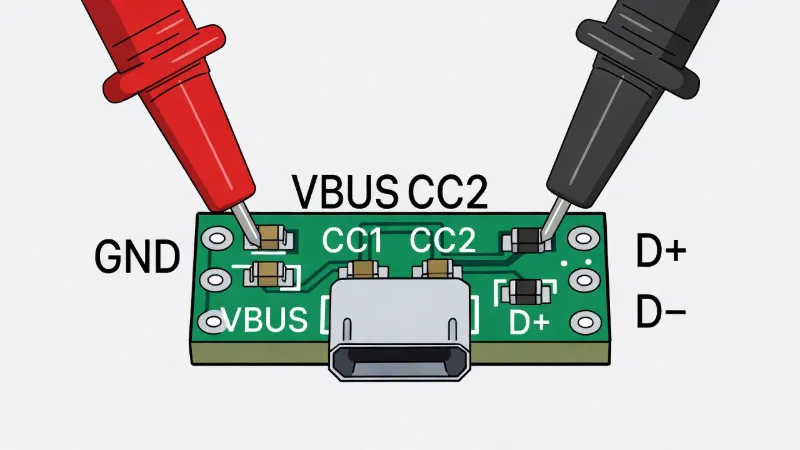
Step 1: Setting Up Your Multimeter
Turn your multimeter dial to the Continuity symbol. Touch your two probes together. If you hear a beep, you are ready. Plug each end of your cable into a breakout board. Now you have easy access to the pins.
Step 2: Checking the Ground (GND) Pin
The most important wire is the Ground (GND). If this is broken, nothing works.
- Find the pad labeled GND on the first breakout board.
- Find the GND pad on the second board.
- Touch one probe to each pad.
- Listen for the beep. No beep means the wire is snapped.
Step 3: Checking the Power (VBUS) Pin
This is the wire that carries the actual charging power.
- Locate the VBUS pad on both ends.
- Touch the probes to these pads.
- If it beeps, your cable can carry power.
- If the multimeter shows numbers but does not beep, you have high resistance. The wire is likely too thin or damaged. This causes slow charging.
Step 4: Testing the CC Pin
Many people get confused here. The "CC" (Configuration Channel) pin talks to your charger. If this pin is broken, your phone will not switch to fast charging.
- Touch the CC pad on one end.
- Touch the CC pad on the other end.
- You should hear a beep.
- If this is silent, the cable will charge your phone very slowly or not at all.
4. Interpreting Your Results
You finished the test. What do the results mean?
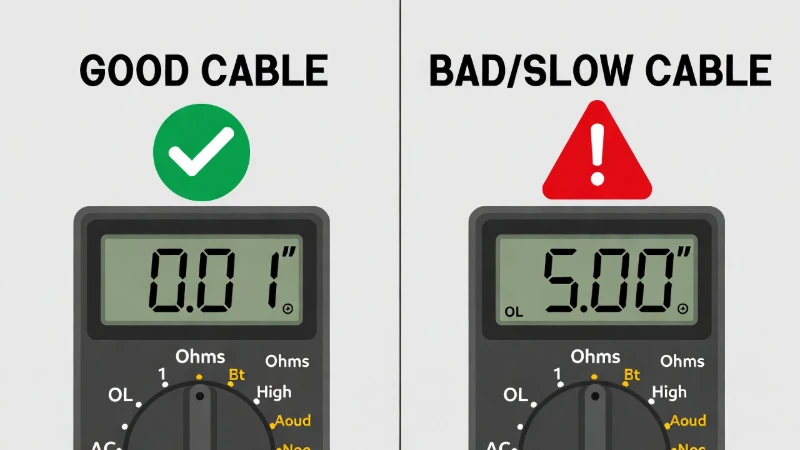
| Result | Diagnosis | What to do |
|---|---|---|
| Solid Beep (All Pins) | Healthy Cable | Check your phone port or wall brick. |
| No Beep (VBUS/GND) | Broken Wire | The internal copper snapped. Trash it. |
| Numbers but No Beep | High Resistance | Low quality. Use for headphones only. |
5. Frequently Asked Questions
Can I test without a multimeter?
Not accurately. You can try plugging it into different devices to see if it works, but that is guessing, not testing. A multimeter gives you a verified answer.
Why does my cable work when I flip it?
This is a classic sign of a damaged pin. USB-C has pins on both the top and bottom. If one side is damaged, flipping the cable connects the phone to the "good" side.
Is data continuity different from charging?
Yes. Charging uses the VBUS and GND pins. Data transfer uses the D+ and D- pins. A cable can be good for charging but bad for moving photos.