
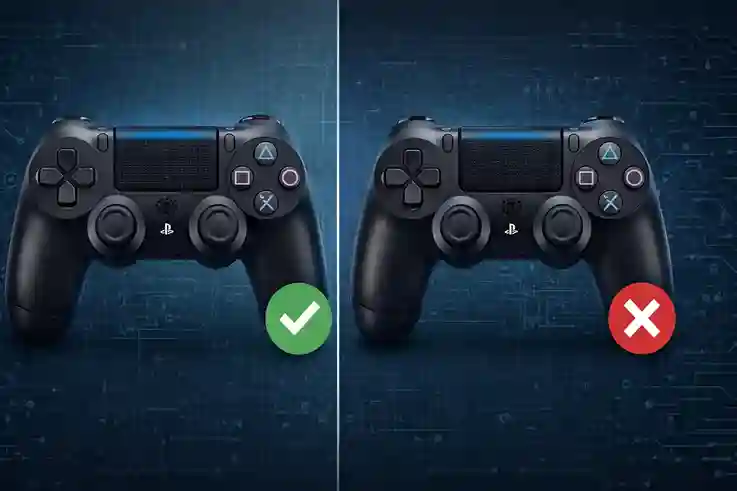
Physically, they look identical. But the internal data tells a different story.
You found a great deal on a controller. The box looks official. The logo is perfect. But the moment you started playing, something felt wrong. Maybe the aim was twitchy, or the movement felt stiff.
Here is the truth: Cosmetic fakes are getting too good to spot with the naked eye. The sticker on the back can be copied perfectly. But the cheap electronics inside? They cannot hide from a data test.
We are going to skip the generic advice about checking the font on the box. Instead, we will look at the digital fingerprint. Here is how to use a fake vs. real controller tester to know for sure if you have the real deal or a cheap knockoff.
Why You Need a Fake vs. Real Controller Tester Tool
Most people look at the outside of the controller. That is a mistake. Counterfeit factories spend all their money on the plastic shell to fool you. They save money by using terrible sensors inside.
When you plug your device into a tool like Gamepad Tester, you are looking at the raw data coming from the circuit board. A real Sony or Microsoft controller uses high-quality parts that create smooth, specific numbers. A fake controller uses generic parts that create messy, jagged data.
Let’s look at the specific tests you need to run.
The Circularity Test: The Best Way to Spot Counterfeit Controllers
This is the "smoking gun." This single test catches about 90% of fakes instantly.
Analog sticks are made of two sensors (potentiometers). On a genuine controller, these sensors work together to track a near-perfect circle when you spin the stick.
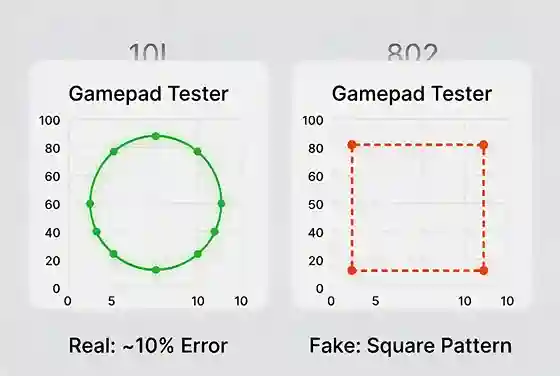
Real controllers trace a circle. Cheap fakes often trace a square or diamond shape.
How to test it:
- Connect your controller to your PC or phone.
- Go to the tester site and find the "Circularity" or "Outer Deadzone" test.
- Rotate your thumbsticks in a full circle 5-10 times.
What to look for:
- The Real Deal: You will see a circular shape on the screen. The "Average Error" rate should usually be between 8% and 12% for a DualShock 4 or DualSense.
- The Fake: You might see a square shape. Or, you might see a wildly high error rate (over 20%).
- The "Smart" Fake: Some fakes are hacked to show 0.0% error. Be careful here. A genuine analog stick is analog—it has tiny imperfections. A perfect 0.0% usually means the controller is lying to the software to hide how bad it is.
Check Dead Zones to Distinguish Fake vs. Real Controllers
The "dead zone" is the small area in the center of the stick where no movement is registered. Manufacturers add a tiny dead zone so your character doesn't drift when you aren't touching the controller.
Counterfeiters know their sticks are loose and drifting. To hide this, they hard-code a massive dead zone.
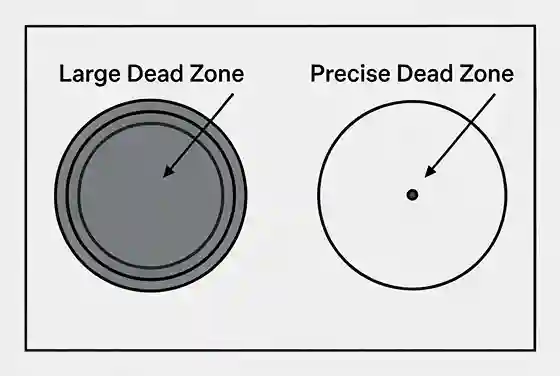
Fakes hide their stick drift by forcing a massive dead zone in the center.
How to spot it: Move the stick very slowly from the center.
- Real: The dot on the screen should move almost immediately (slight touch).
- Fake: You might have to push the stick 20-30% of the way to the edge before the dot on the screen even moves. This makes precise aiming in games impossible.
Inspecting Polling Rates and Input Lag
The polling rate is how often the controller "talks" to your console or PC.
- Standard Real Speed: A standard PS4 controller over Bluetooth usually polls around 250Hz (reports 250 times per second).
- Fake Speed: Many cheap clones use older, slower Bluetooth chips. They often cap out at 100Hz or 125Hz.
If your "Pro" controller feels laggy, check the Hz rating on the tester. If it is stuck at a low number and never fluctuates, it is likely a counterfeit.
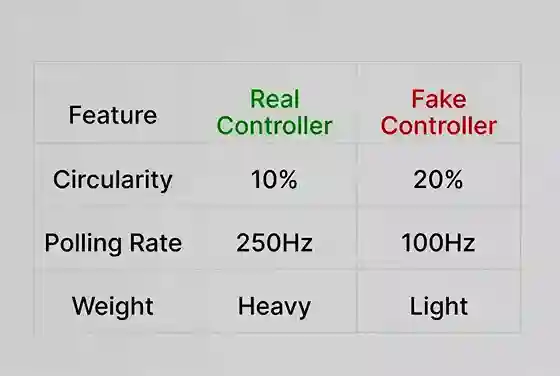
| Feature | Genuine Controller Data | Counterfeit Controller Data |
|---|---|---|
| Circularity Error | ~8% - 14% | > 20% OR exactly 0.0% |
| Dead Zone | Small, precise | Large, jumpy |
| Polling Rate | ~250Hz+ (varies) | Often low (<150Hz) |
| Stick Movement | Smooth circle | Often forms a Square |
Physical Signs to Confirm Your Results
Once the data makes you suspicious, you can do a final physical check to be 100% sure.
- The Weight: Real controllers have dense batteries and rumble motors. Fakes feel hollow. A real DualShock 4 is roughly 210-220 grams. If yours is 180 grams, it's missing parts.
- The Button Feel: Real buttons have a tactile "bump" when you press them. Fakes often feel "mushy" or just slide down without a click.
- The Light Bar: On many fakes, the light bar is just a cheap LED shining through plastic, making it look spotty. On real ones, the light is evenly diffused.
Final Verdict
If you ran these tests and saw "Square" movement, huge dead zones, or the wrong polling rate, you have a fake.
Do not try to "fix" it. These are hardware flaws. The sensors are cheap, and no amount of software updates will make them accurate. Your best move is to screenshot the tester results (showing the error rates) and send that picture to the seller as proof for your refund.
Frequently Asked Questions
What is a good circularity error rate for a PS4 controller?
A genuine Sony DualShock 4 controller typically has a circularity error rate between 8% and 12%. If the error is significantly higher (20%+) or suspiciously perfect (0.0%), it is likely a fake.
Can a fake controller connect to a PC tester?
Yes, fake controllers will connect to a PC and appear on tester tools. However, they identify themselves as generic devices (like "Wireless Controller") rather than the official specific ID, and their performance data will be poor.
Why does my analog stick move in a square on the tester?
This is a common sign of a counterfeit. Cheap controllers use low-quality components that cannot register corner inputs correctly, forcing the output into a square shape instead of a circle.