
You hit the button, but your character shoots a split second too late. You lose the fight. Was it your reaction time, or was it your controller? Most gamers assume plugging in a USB cable is always faster. Here is the thing: raw speed tests sometimes show Bluetooth is technically faster. But if you care about winning in competitive games, you need to understand the difference between speed and consistency.
1. Bluetooth vs. Wired: The Core Difference
To pick the right connection, you need to understand two simple concepts: Input Lag and Jitter.
- Input Lag (Latency): How long it takes for the signal to travel from your controller to the console. Lower is better.
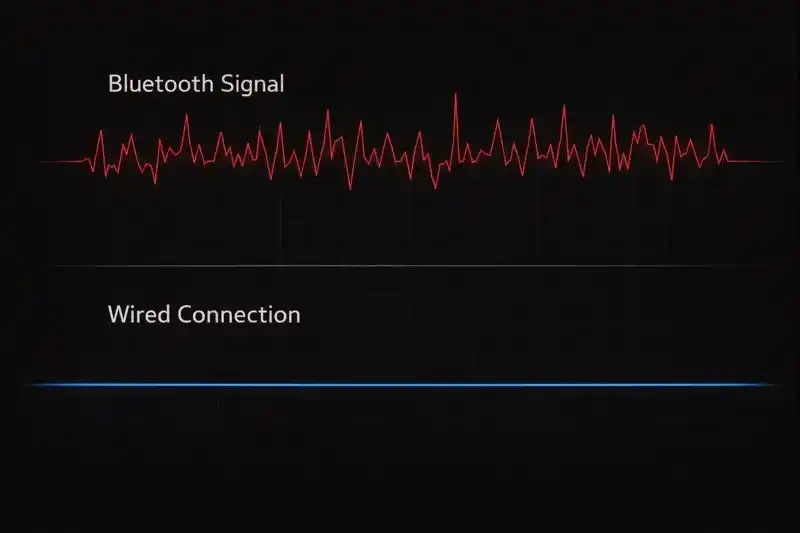
- Jitter (Stability): How consistent that speed is. If your controller is fast one second but slow the next, that is high jitter.
The "Polling Rate" Trap
Here is where it gets tricky. Many standard controllers (like the DualSense) run at a higher polling rate over Bluetooth than they do over a standard USB connection on a PC.
- Bluetooth: Often polls at 1000Hz (updates 1000 times a second).
- Wired (Default): Often locked to 250Hz on PC unless you overclock it.
2. Why Consistency Matters More Than Speed
Imagine you are driving a car. Bluetooth is like a sports car that can go 200 mph, but the engine stalls randomly every few miles. Wired is like a train that goes 150 mph but never stops or slows down.
For competitive play, the train wins.
Bluetooth is a radio signal (2.4GHz). It fights for space with your Wi-Fi router, your phone, and even your microwave. This causes "packet loss." You might have 3ms of lag most of the time, but suddenly it spikes to 40ms right when you need to aim. That spike makes you miss.
3. Platform Breakdown: Performance Guide
For PC Gamers
Winner: Wired (with a tweak)
On a PC, a wired connection is best, but you have to be careful. Windows often defaults USB controllers to a slow update rate. You may need to "overclock" your controller polling rate to get the best performance.
For PS5 Gamers
Winner: Wired (Specific Settings Required)
Sony controllers are incredibly fast over Bluetooth. However, tournament venues are full of wireless noise.
Important Warning
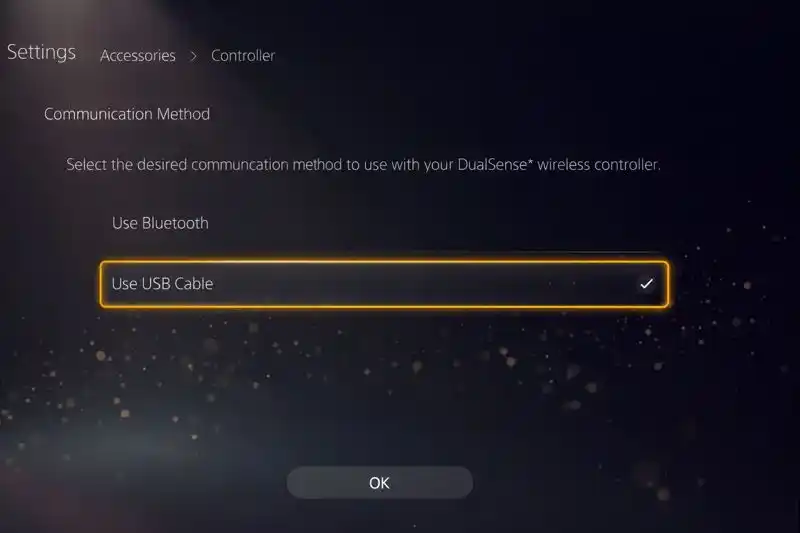
Plugging your USB cable into a PS5 does not automatically switch it to wired data mode. It often just charges the battery while still using Bluetooth.
For Xbox Gamers
Winner: Wired
Xbox does not use standard Bluetooth for its own consoles; it uses a proprietary "Xbox Wireless" signal. This is better than standard Bluetooth but still not as stable as a wire. For the absolute best response time, plug it in.
4. Quick Comparison
| Feature | Bluetooth | Wired Connection |
|---|---|---|
| Raw Speed | Very Fast (Varies) | Fast |
| Stability (Jitter) | Low (Unstable) | High (Very Stable) |
| Interference Risk | High (Wi-Fi, Phones) | None |
| Best For | Casual / RPGs | Ranked / Competitive |
5. How to Test Your Own Controller
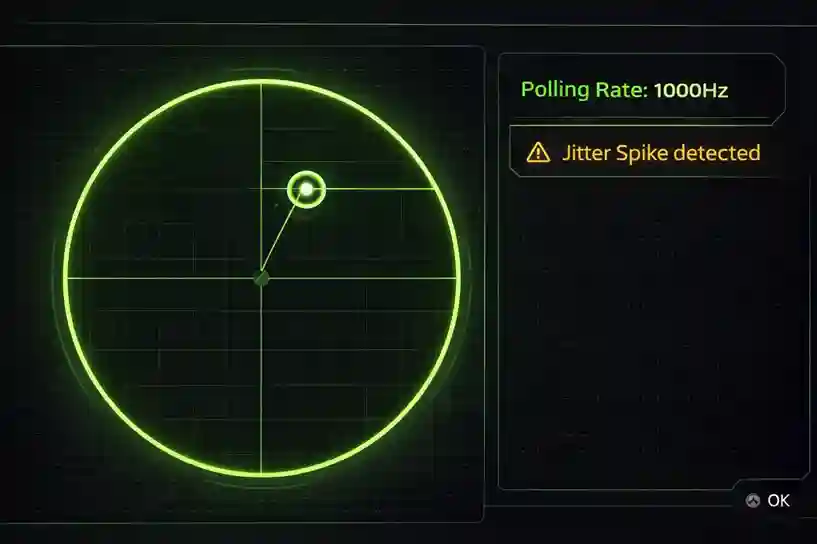
You do not have to guess. You can see the data yourself right now. Use our free Gamepad Tester Tool on this site to check your connection health.
- Plug in your controller (or connect via Bluetooth).
- Move the analog sticks in circles rapidly.
- Look at the "Polling Rate" number on the screen.
- Look for red spikes on the graph.
Final Verdict
If you play single-player games like Elden Ring, use Bluetooth. The freedom is worth the tiny delay.
If you play competitive games like Call of Duty, Rocket League, or Valorant, use Wired. In a ranked match, consistency is king. Eliminating wireless interference gives you the confidence to play your best.
Frequently Asked Questions
Is Bluetooth actually faster than wired?
Technically, yes, in some raw numbers Bluetooth can have lower input delay. However, it suffers from jitter (inconsistent delays), which makes it worse for competitive gaming.
Does plugging in my controller make it faster?
Plugging in usually stabilizes your connection. However, on consoles like the PS5, you must manually change the settings to ensure data travels over the cable.