
Rocket League Pro Settings: Aerial Control & Speed
Rocket League is a game of pure physics. There is no aim assist, no RNG, and no help. Your car does exactly what your controller says. This makes your Deadzone and Sensitivity settings the most important factors in your mechanical consistency. If your car feels "heavy," it's not the server—it's your settings.
The "Heavy Car" Fix: Deadzones
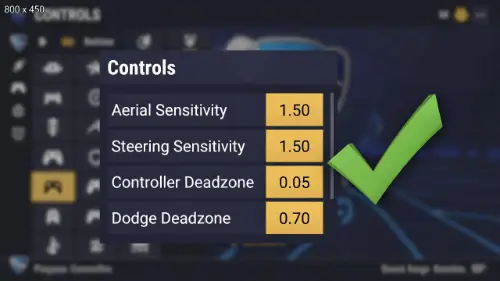
The Controller Deadzone determines how far you must push the stick before the car turns. The default is often too high (0.20+), creating a delay between your brain and the screen.
Most pros (Squishy, Zen, Vatira) play between 0.05 and 0.10. This makes the car feel snappy and responsive. However, lowering it too much introduces drift, which can cause your car to tilt slightly during aerials, ruining your shot. You need to find the lowest possible number where your car drives straight without input.
Aerial & Steering Sensitivity
At default sensitivity (1.0), it takes too long to rotate your car for a flip reset or double tap. You need to turn faster.
The competitive "sweet spot" is usually between 1.30 and 1.50. Going higher than 2.0 makes you spin incredibly fast, but makes precision touches nearly impossible. Our guide helps you incrementally increase this setting so you don't ruin your muscle memory overnight. We also cover the critical difference between Directional Air Roll (bound to buttons) vs. free air roll.