
Overwatch 2 Aim Guide: Fixing the "Floaty" Feel
Overwatch 2 has arguably the most complex controller settings menu of any shooter. Default settings often feel "floaty" or heavy, making it nearly impossible to track a blinking Tracer or a flying Echo. The culprit is usually a combination of Aim Smoothing and the wrong Aim Technique.
Dual-Zone vs. Linear Ramp
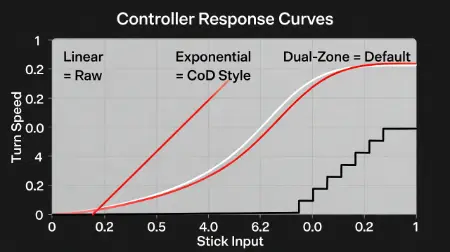
Overwatch defaults to Dual-Zone. This splits your stick into two distinct zones: a slow inner zone for tracking and a fast outer zone for turning. The problem is the "jump" between these zones is sudden. It is inconsistent.
Many high-level hitscan players (Cassidy, Soldier: 76, Widowmaker) switch to Linear Ramp or Exponential Ramp. These provide a consistent acceleration curve that allows for building genuine muscle memory. However, switching requires you to also tune the "Aim Ease In" slider to prevent the aim from feeling too jittery.
The Enemy: Aim Smoothing
Aim Smoothing is effectively artificial input lag. Blizzard adds it to make camera movements look cinematic, but it ruins competitive aim. At 100 (default), your crosshair drags behind your thumb. We strongly recommend reducing this to 0 for pure reflex speed, or 30-50 if you need a little stability. Lowering this setting is the single most impactful change you can make to your gameplay.