
You finally got your Steam Deck. You start playing, but you notice something annoying. The left side of your Steam Deck trackpads feels weak. Or maybe the right side buzzes loudly while the other side is quiet. It feels broken, right?
Here is the good news: It probably isn't. Many users report that their Steam Deck trackpads feel uneven straight out of the box. While some cases are hardware defects, most are actually just software glitches. Before you pack up your device to mail it back to Valve, let’s try to fix it.
Why Your Steam Deck Trackpads Feel Uneven
It is common to feel a difference between the left and right Steam Deck trackpads. Usually, this happens because the haptic motors (the parts that vibrate) are calibrated differently at the factory. Sometimes, a SteamOS software update can mess up these settings.
Here is what you might be feeling:
- The "Dead" Pad: One trackpad barely vibrates when you use it.
- The Rattle: One side makes a hollow "clack" sound instead of a tight click.
- The Ghost Buzz: The trackpad vibrates even when you aren't touching it.
If your buttons still work, we can likely fix the feel with software tweaks.
How to Calibrate Steam Deck Trackpads Haptics (The Reset Fix)
This is the most effective fix for uneven vibration. It forces the SteamOS to "wake up" the haptic drivers and reset them to equal strength. Follow these exact steps to reset your Steam Deck trackpads:
- Press the Steam Button on your device.
- Go to Settings and scroll down to Controller.
- Look for the button that says Calibration & Advanced Settings.
- Select Haptics Settings.
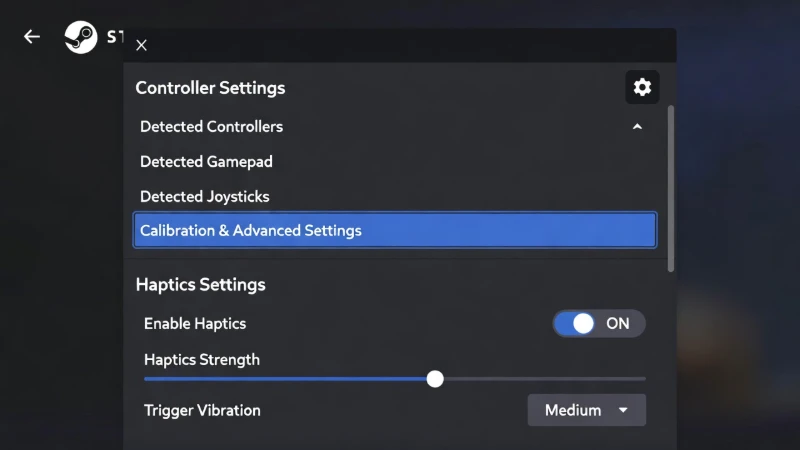
Navigate to Calibration & Advanced Settings to reset your haptic drivers.
The Magic Fix:
- Slide both the Left and Right haptics to OFF (0).
- Exit the menu completely.
- Go back in and slide them both to MAX (10).
- Restart your Steam Deck.
After the restart, go back to the menu. Set the sliders to your preferred level (usually around 5 or 6). This "shock to the system" often fixes the uneven feeling.
Customizing Steam Deck Trackpads for Specific Games
Sometimes, the trackpad feels weird only in one specific game. This is because Steam Input allows every game to have its own unique settings. You might have "High Haptics" on for a shooter game, but "Low Haptics" for a strategy game.
Here is how to check the game-specific settings:
- Open the game that feels wrong.
- Press the Steam Button while the game is running.
- Scroll right to Controller Settings.
- Select Edit Layout.
- Go to the Trackpads tab.
- Look for the Haptics gear icon next to the trackpad behavior.
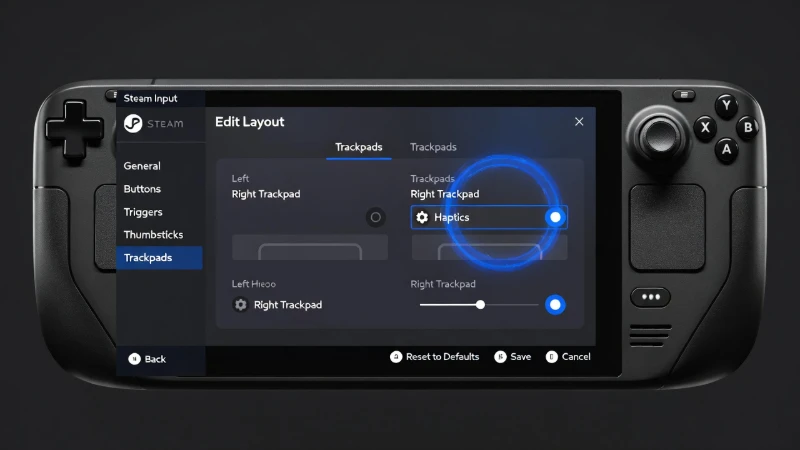
Use the gear icon in the Edit Layout menu to adjust vibration for a single game.
Here, you can turn the haptics up or down just for that game. If a game uses too much vibration, turn it down here. This saves battery and stops that annoying buzzing noise.
Fixing the Rattling Noise in Steam Deck Trackpads
If your issue isn't software—if it sounds like a loose screw rattling around—it might be a physical tension issue. Many users found that the Steam Deck trackpads rattle because the backplate screws are too tight. This warps the plastic slightly.
The Tension Fix:
Warning: You need a correct screwdriver (Philips #0 or #00) to do this. Do not strip the screws.
- Locate the screws on the back of the grip behind the rattling trackpad.
- Loosen the screw just a tiny bit (about 1/4 of a turn).
- Test the trackpad click.
Often, relieving this pressure stops the plastic from clicking against itself.
Steam Deck Trackpads Pressure vs. Haptic Feedback
It is easy to confuse "Pressure" with "Haptics." Let's clear that up so you know what you are actually adjusting.
| Feature | What it does | How it feels |
|---|---|---|
| Pressure Sensitivity | Detects how hard you press. | It feels like nothing—it's just data. |
| Haptic Feedback | Vibrates to simulate a click. | It feels like a physical button snapping. |
If your Steam Deck trackpads are hard to press, you don't need more vibration. You need to adjust the Soft Press Threshold in the Edit Layout menu.
FAQ Section
Why is my left Steam Deck trackpad weaker than the right?
This is usually a software calibration bug, not a hardware failure. The motors are set to different values in the firmware. Trying the "0 to 10" reset trick in the Controller Settings usually syncs them back up.
Can I turn off haptics on Steam Deck trackpads completely?
Yes. Go to Settings > Controller > Calibration & Advanced Settings > Haptics. Move the sliders to zero. This turns off vibration for the trackpads system-wide.